Shivani logo
Projects

Productivity Tool for Transfer Students

TransferX brings course planning, college discovery, deadlines and application resources into one connected workspace.
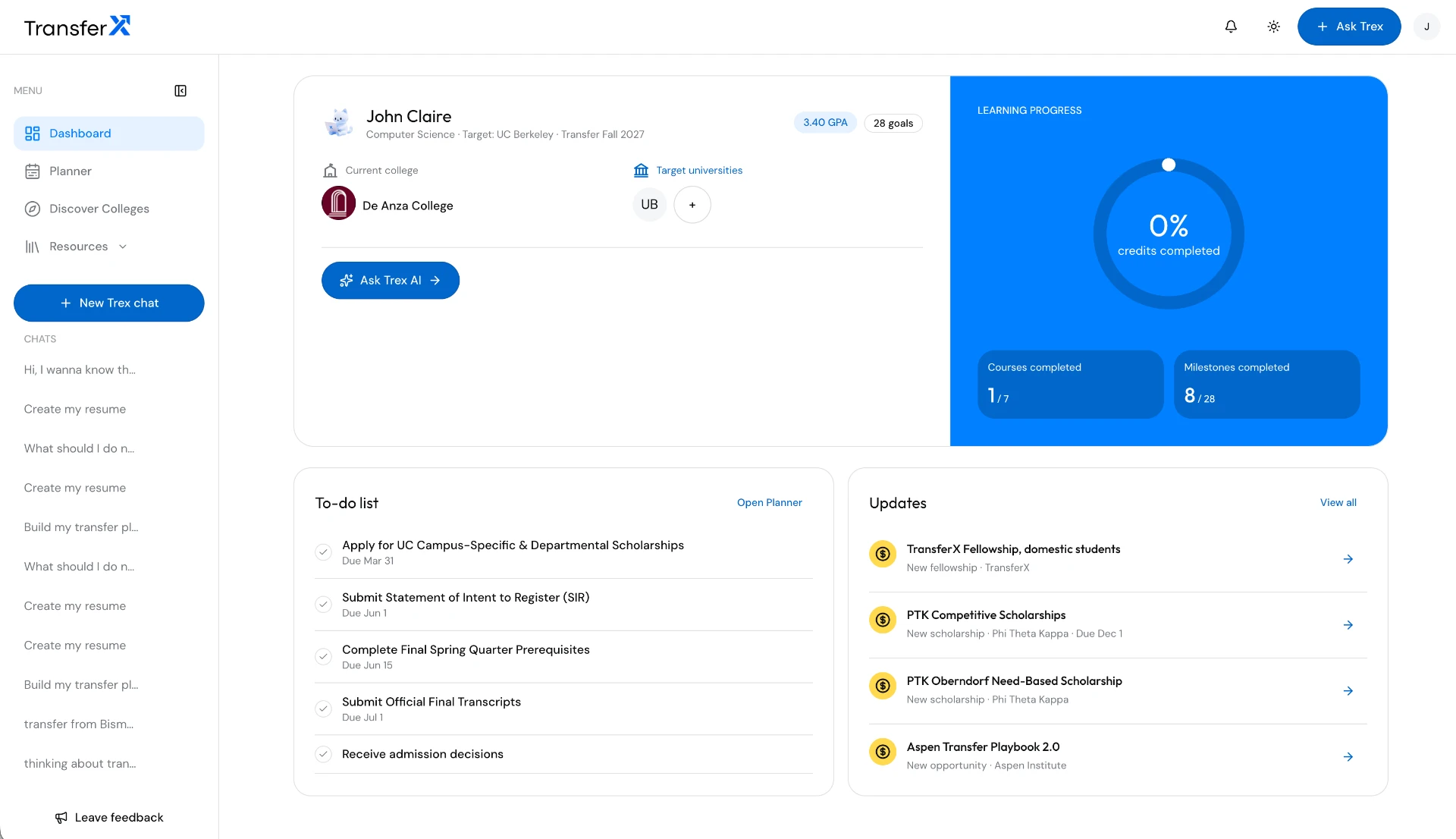
TransferX dashboard
Current product screen · Progress, upcoming tasks, and opportunities in one overview. Demo student data.

Overview

About the project

Product
Web application
Role
Founding Designer
Audience
Transfer students
Stage
In progress
Scope
Product strategy, UX and UI
Impact
Not measured yet

Case study

Problem

Section 01

The gap between intention and transfer

U.S. community colleges enrolled 6.4 million for-credit students in fall 2023. AACC, 2025

Different populations: the intent survey and outcomes cohort are not a single funnel. The commonly cited 13% to 14% figure describes older bachelor’s completion estimates, not transfer rates. CCRC fact sheet

Case study

Research

Section 02

Where the journey gets difficult

One goal. Many moving parts.

Research approach: published transfer research and a review of the current product screens. The supplied content brief adds planning themes, not interview findings. Student interviews and usability testing are still to come.

Illustration of a student comparing course sheets, calendar dates, and college information at a desk.
Concept illustration · The planning context, not an observed research session.

Courses do not always count

Credits can fail to transfer or transfer without applying to a degree. Major-specific prerequisites matter.

Transfer Playbook, 2025

The path is not always clear

Many students lack firm transfer plans or awareness of advising resources.

CCRC, 2025

Timing affects opportunities

For example, UMD requires a completed fall transfer application by March 1 for merit-scholarship consideration.

University of Maryland

These barriers inform the design. They do not establish a single cause for national transfer outcomes.

Section 13

Research & resources

Supporting project material

  • SJ EXP Product Unfiltered: the designer’s account of problem exploration, the Lovable working version, approval, and standalone development.
  • SJ EXP Product Final: product principles, California transfer focus, original identity assets, icons, and Trex. Its title does not establish launch or validation.
  • Product lifecycle and user journey notes: used to separate discovery, first-use planning, and later engagement.
  • TransferX trend report and 30 scripts: used as a communication brief for course checks, timelines, and application support, not as student research or product-performance evidence.

Campaign scenarios, social-media benchmarks, and unverified application dates from the content brief are not treated as case study findings.

Case study

Persona: user needs and requirements

Section 03

Define the design challenge

How might we help transfer students turn college requirements into a clear plan they can act on?

Who I am designing for

  • Community-college students preparing to transfer to a four-year university.
  • Initial focus in the earlier product chapters: California community-college students planning for UC and CSU campuses.
  • Working scenario, not a research-backed persona: a student balancing coursework, applications, and an uncertain next step.

The hypothesis to test

  • Connecting courses, target colleges, and deadlines may make the next action easier to identify.
  • Clear requirement labels may reduce assumptions about which courses count.
  • A shared planning context may make resources and AI support more relevant.

The first usable experience

  • Set up a student profile and transfer goal.
  • Shortlist a university and build a term-by-term plan.
  • Find the next milestone and relevant support.

Boundaries of the product

  • A planning aid, not an admissions decision or guaranteed credit evaluation.
  • Official college requirements and advising remain the source of truth.
  • Growth and retention come after the core planning experience is validated.

Section 04

Map the student journey

A proposed journey from first exploration to application review. These friction points are design assumptions to validate with students, not observed interview findings.

  1. StartGather coursework
  2. ExploreChoose a destination
  3. PlanConnect requirements
  4. PrepareWork on next steps
  5. ReviewVerify and apply
Proposed journey · Students can revisit earlier choices.
  1. 01

    Find a starting point

    Student action
    Explore transfer options and gather current coursework.
    Potential friction
    Requirements are spread across college pages and personal notes.
    Design response
    A profile with current college, completed courses, and transfer goals.
  2. 02

    Choose a destination

    Student action
    Compare universities, majors, costs, and eligibility.
    Potential friction
    A promising college may not fit the student’s course plan.
    Design response
    A shortlist connected to preferences and target requirements.
  3. 03

    Build the plan

    Student action
    Arrange remaining courses and application milestones.
    Potential friction
    Missing a prerequisite can change the sequence of the plan.
    Design response
    Term-by-term planning with requirement tags and alternatives.
  4. 04

    Keep moving

    Student action
    Return to tasks, scholarships, essays, and questions.
    Potential friction
    The next step can get lost between separate tools.
    Design response
    A dashboard that brings pending work and resources together.
  5. 05

    Review and apply

    Student action
    Check requirements and prepare the application.
    Potential friction
    An AI answer or saved plan still needs official verification.
    Design response
    Student review and college guidance remain part of the process.

Case study

Solution

Section 05

Organize around the student’s goal

Proposed information architecture: a shared student profile connects five areas. The dashboard summarizes the work; the planner holds the actionable detail.

Student profile + transfer goal

Current college, major, completed courses, target term, and preferences.

  • Discover

    University search, preferences, and saved choices.

  • Planner

    Courses, terms, requirements, and milestones.

  • Dashboard

    Progress, upcoming tasks, and opportunities.

  • Trex AI

    Transfer questions, resume, and essay support.

Official college requirements remain the source of truth.
Proposed information architecture · One profile connects the planning experience.

Naming and grouping will be checked with students before treating this structure as final.

Section 06

From a transfer goal to a next action

The proposed core task flow: profile → target college → course plan → next action. Students should be able to revisit earlier choices when their goals change.
  1. 01

    Start with the student

    • Collect current college, major, completed courses, and transfer goals.
    • Build a profile that stays connected to the plan.
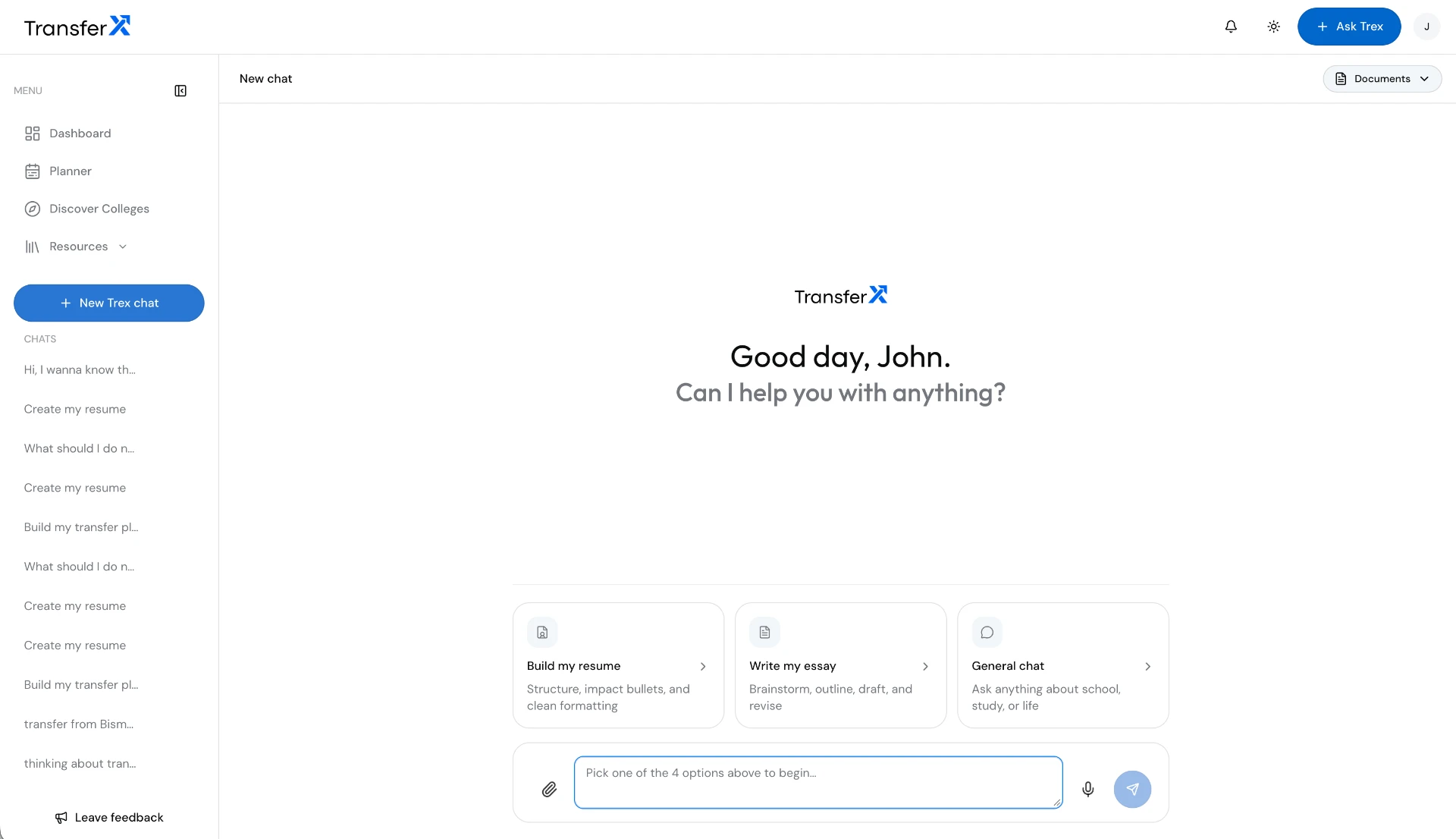
    Dashboard overview
  2. 02

    Map the destination

    • Shortlist universities by preferences and requirements.
    • Connect target-college prerequisites to current-college courses.
    University discovery
  3. 03

    Make the plan actionable

    • Organize courses by term, with requirement tags and eligible alternatives.
    • Bring applications, scholarships, and milestones into the same timeline.
    Academic planner
  4. 04

    Support the next step

    • Add Trex AI for transfer questions, resume drafts, and essay support.
    • Keep official requirements and student review central to decisions.
    Trex support

Section 07

From a question to a working product

The earlier TransferX chapters trace the move from a website project to a working version, then into standalone product development. This is the build story, not a record of validated outcomes.

Requirements

Where do I start?

Courses

What carries over?

Deadlines

What comes next?

Problem-space prompts from Product Unfiltered, not student quotes.

  1. Trex waving01

    Understand the problem

    I started with the transfer path: requirements, course choices, deadlines, and applications. The website brief grew into a product direction.

  2. Trex planning02

    Make the idea tangible

    I used Lovable to build the first working version for product testing. A working prototype made the idea tangible; it did not establish usability.

  3. Trex celebrating03

    Build with a team

    After the first version was approved, a team came together to develop TransferX as a standalone product. The work moved beyond individual screens.

Build history adapted from my SJ EXP Product Unfiltered chapter. Original wireframes, dated comparisons, and testing feedback are not supplied, so no before-and-after improvements are claimed.

Section 08

The product taking shape

Current product screens show how the planning concept is taking shape. They demonstrate the design direction, not proof of a fully working or validated experience.

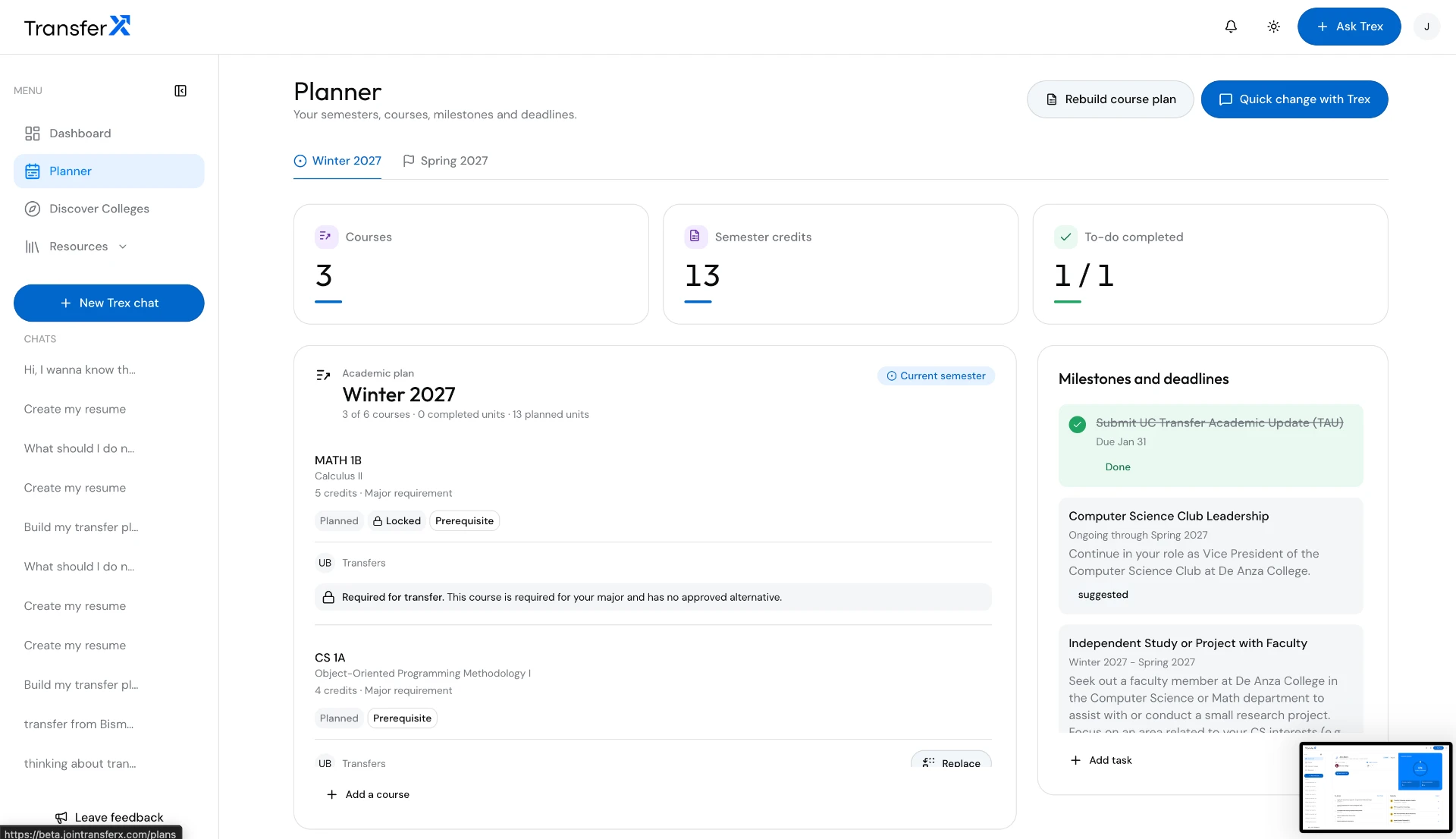
A plan students can act on

  • Term-by-term courses and credit totals.
  • Prerequisite, major requirement, and transfer tags.
  • Course replacement options where eligible.
  • Application milestones, deadlines, and progress.
TransferX academic planner
Current product screen · Course requirements alongside milestones and deadlines. Demo plan.

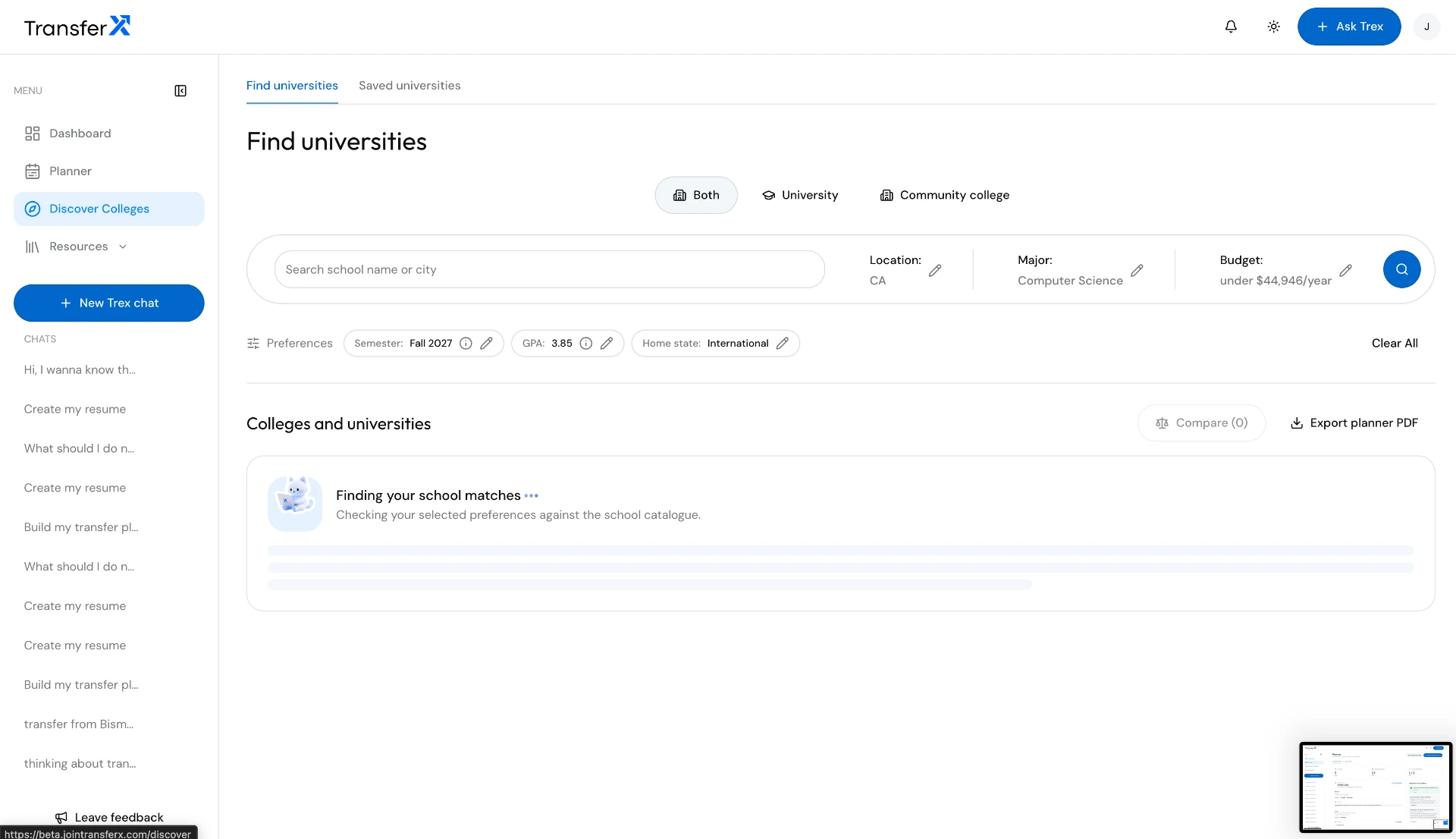
A shortlist with context

  • Preferences for major, location, budget, GPA, and transfer term.
  • University discovery, saved choices, and comparison.
  • Target colleges connected to the student’s profile and plan.

Comparison supports the student’s choice. A fit score is not a prediction of admission.

TransferX university discovery
Current product screen · University search preferences, shown during matching.

Support beyond the course list

  • Trex AI for transfer-related questions.
  • Resume structure and essay brainstorming, drafting, and revision.
  • Scholarships and resources surfaced alongside upcoming tasks.

AI support is not an admission guarantee or a substitute for official college guidance.

TransferX Trex AI
Current product screen · Entry points for resume, essay, and chat support.

Section 09

The reasoning behind the design

Overview before detail

  • The dashboard foregrounds progress, tasks, and updates.
  • Course-level detail stays in the planner.
  • Tradeoff: a progress summary needs to explain what completion actually means.

Requirements beside courses

  • Tags keep prerequisite and transfer context close to each course.
  • Alternatives support adjustments without losing the goal.
  • Tradeoff: mappings need a reliable source and review when requirements change.

AI with a defined purpose

  • Resume, essay, and chat entry points make support easier to choose.
  • Trex supports preparation rather than making admission decisions.
  • Tradeoff: helpful answers can still be wrong and need official verification.

Real sources. Not false certainty.

Requirements, deadlines, and course mappings should lead back to official guidance. These are verification references, not claimed product integrations.

Section 10

Many pieces. One shared language.

The Product Final chapter adds the system behind the screens: documented components, custom icons, Trex, and rules for type, spacing, color, and motion.

IdentityTransferX product wordmark

One identity across the website, planner, and support experience.

Product typography

Aa

Outfit + DM Sans

The original product type pairing. This portfolio retains Poppins + DM Sans.

Custom icon language
  • Plan
  • Campus
  • Milestone

Consistent symbols for planning, destinations, and progress.

Meet Trex
Trex wavingTrex planningTrex celebrating

A recurring mascot for a recognizable, approachable product.

Original identity assets from SJ EXP · Design-system specimens, not usability evidence.

Case study

Testing plan

Section 11

Test the core experience before scaling

Illustration of a student trying a planner while a designer observes and takes notes.
Concept illustration · Planned usability testing, not a completed session.

Observe. Revise. Retest.

Planned moderated usability sessions with students preparing to transfer, followed by a requirements review with college guidance. Start with the core tasks, record confusion, then revise and retest.

Create a starting profile

Task
Enter a current college, major, completed courses, and target term.
Watch for
Where students hesitate, skip information, or need help.
Measure
Task completion and time to a usable starting profile.

Find a suitable college

Task
Use preferences to shortlist a university and explain the choice.
Watch for
Whether students understand the match and its limitations.
Measure
Completion, comparison errors, and confidence in the choice.

Adjust a course plan

Task
Identify a required course and review an eligible alternative.
Watch for
Whether requirement tags and course dependencies make sense.
Measure
Incorrect substitutions and requests for assistance.

Identify the next action

Task
Find an upcoming milestone, then use Trex for an application question.
Watch for
Whether students can separate guidance from verified requirements.
Measure
Time to the next action and recognition of what needs checking.

Validation priorities

  • Check course mappings against official college requirements.
  • Test whether students can identify their next action.
  • Review deadline accuracy, resource relevance, and AI guidance.

Success measures to track

  • Time to create a usable transfer plan.
  • Course-plan accuracy and tasks completed on time.
  • Student confidence in their next steps.

Proposed measures. No user-testing or outcome results are claimed yet.

Case study

Next steps

Section 12

Where the work stands

What this version establishes

  • A connected direction for profiles, university discovery, planning, and support.
  • Current interface screens and a proposed end-to-end task flow.
  • A research-informed problem framing with explicit evidence boundaries.

What I need to learn next

  • Which planning decisions students find hardest without assistance.
  • Whether the structure and requirement labels match their mental model.
  • How to keep college requirements current and communicate uncertainty clearly.

The design focus is a trustworthy next step, not simply more features. Student feedback will determine what stays, what changes, and what should wait.